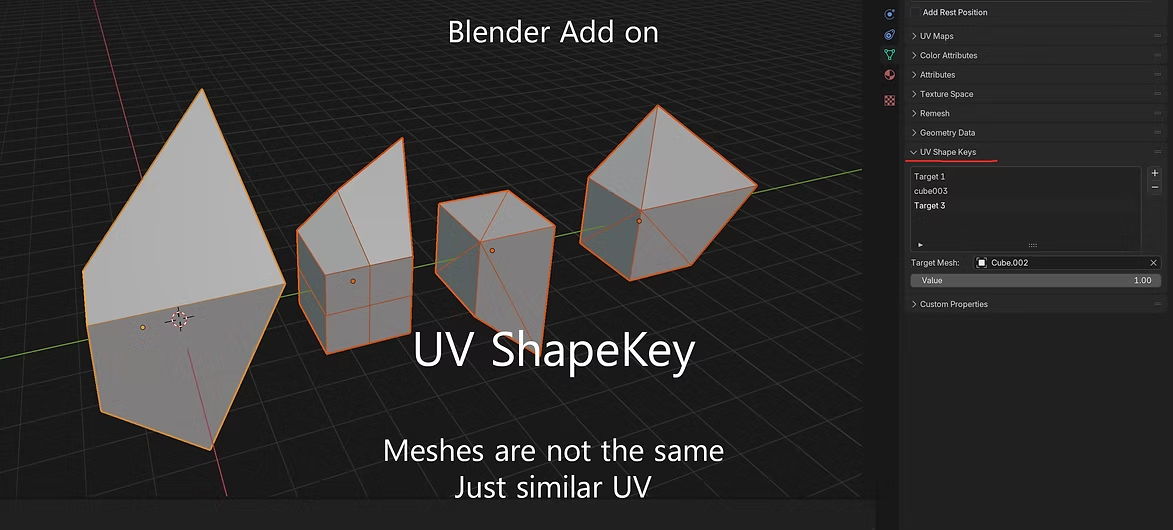
Introducing Blender UVshapekeys: Shape Key Magic Based on UV Layout
A Blender add-on that reconstructs shape keys using UV coordinates instead of vertex IDs, so they survive retopology and topology changes.
Shape keys are a powerful feature in Blender, allowing for smooth deformations and morphs in a 3D model. However, the default implementation relies on vertex IDs, which can be limiting. If your mesh topology changes (like adding or removing vertices), your shape keys can break: a real headache for artists working in dynamic pipelines or with complex assets.
Enter Blender UVshapekeys, an add-on that redefines how shape keys work by leveraging UV layouts instead of vertex IDs. This approach allows shape keys to function even when vertex counts or orders change, opening up new possibilities for workflows involving retopology, model edits, and cross-software compatibility.

Why Blender UVshapekeys?
Blender's vertex ID-based shape key system is robust but inflexible:
- Topology dependency: If you edit your mesh, say, during retopology or when importing/exporting between software, the shape keys can break because vertex IDs no longer match.
- Limited cross-mesh flexibility: Applying shape keys between different meshes (like variations of a model) is nearly impossible unless their vertex orders are identical.
Blender UVshapekeys solves this by matching vertices based on UV coordinates instead. UVs are topology-independent, meaning the add-on can calculate shape keys even if the vertex structure changes.
Key features
-
UV-based vertex matching
- Shape keys are reconstructed by finding corresponding vertices based on UV coordinates rather than vertex IDs, ensuring compatibility across meshes with different topologies.
-
Topology independence
- Retopologise, subdivide, or edit your mesh without worrying about breaking shape keys. UV coordinates maintain the relationship between vertices, so your shape keys adapt seamlessly.
-
Cross-mesh application
- Transfer shape keys between similar models with differing vertex counts or layouts, as long as their UV maps align.
-
Easy integration
- Works natively within Blender's existing shape key system, adding flexibility without complicating your workflow.
How it works
-
Prepare your models
- Ensure the source and target meshes have UV maps. The add-on uses these maps to establish a relationship between vertices.
-
Apply the add-on
- Use Blender UVshapekeys to create shape keys for the target mesh by matching UVs to the source.
-
Enjoy the freedom
- Edit topology, retopologise, or transfer shape keys between models without losing deformations.
Who is this add-on for?
Blender UVshapekeys is built for:
- Character artists: Retopologise characters without losing critical facial or body morphs.
- Rigging specialists: Maintain deformation integrity when transferring shape keys between variations of a rigged model.
- Cross-software workflows: Transfer assets between Blender and other DCC tools without worrying about topology changes breaking your shape keys.
Why UV-based shape keys are a game-changer
By focusing on UV coordinates, this add-on introduces a level of flexibility that transforms how you work with shape keys:
- Topology-agnostic workflows: Forget about rigid vertex orders. UVshapekeys adapts to your mesh changes.
- Expanded creative freedom: Edit your models without worrying about losing essential deformations.
- Enhanced pipeline compatibility: Use shape keys across different meshes, projects, or even software with ease.